
Submarining Evaluation Tool
The Submarining Evaluation Tool is a GUI-based pre- and postprocessing package for objective submarining assessment in occupant simulations. It currently supports the indicator definition “Nearest Node Dynamic” (NND), which uses the coordinates of the left and right ASIS nodes together with all lap-belt nodes.
The indicator is evaluated in three steps for each time step and for both body sides. First, a very narrow local search region is defined around the ASIS in lateral direction in order to identify the nearby lap-belt segment. Second, from this candidate node set, the belt node located most inferior relative to the ASIS is selected as representative of the local belt edge. Third, the signed longitudinal distance in x-direction between the ASIS and this representative belt node is calculated. Repeating this procedure over time yields the characteristic distance histories used for submarining assessment (see further details in Ircobi Paper by Rees et al. 2025 (https://www.ircobi.org/wordpress/downloads/irc25/pdf-files/2547.pdf).
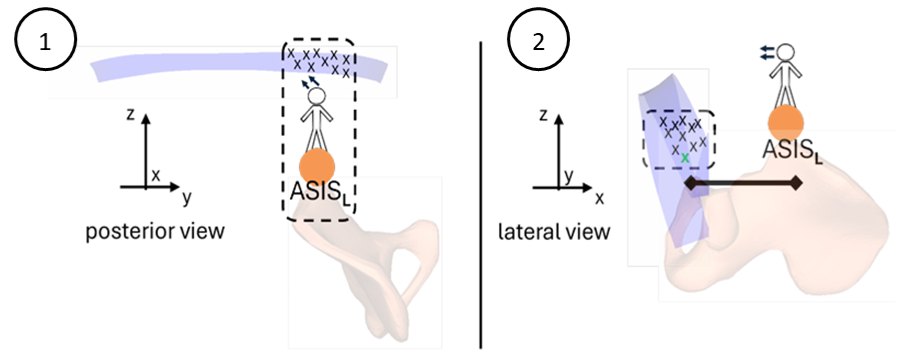
The tool allows users to generate the required input key-file, evaluate single or multiple simulation runs from binout data, and export plots and detailed result tables.
Scripts and Documentation
| Operating system |
Version
|
Last upload
|
Remarks
|
|
| Linux and Windows | V01 | July 2026 |
provided by Marius Rees (BMW) (contact: Marius.Rees@bmw.de) |
|
The provided .zip package contains:
- a preprocessing executable for generating the required evaluation key-file,
- a postprocessing executable for evaluating simulation results,
- Windows and Linux versions of both tools,
- example simulation data with two test runs,
- an example pre-processing key-file,
- a readme document
The Linux versions of both GUIs are packaged as standalone executables, do not require a separate Python installation, and have been tested on RHEL 8. The Windows versions of both GUIs are also packaged as standalone executables and do not require a separate Python installation.
Recommended platform: Linux (faster startup and generally better runtime performance); the Windows version may start significantly slower in some environments (up to 2-3 minutes).